
Readable® Suite
Sensory Readable Suite for Windows takes text-to-speech and visual readability support to the next level. Browse the key advantages of the Readable Suite below. A Readable Suite for Mac is also now available.

Reading & listening
Point & speak
Select any text and Readable will speak it — Click and Play (F7) in Microsoft Word, Edge, Outlook and more. With Point & Speak, simply move your cursor over text, press the Ctrl key and hear it spoken. Readable v3 reaches every kind of text: the live text your applications provide, plus inaccessible text on screen — an image, a scan, a page photo or a locked PDF.
How does it work →Text to speech
Readable uses locally installed, high-quality Natural text-to-speech to turn text into clear, natural speech — all on your PC, with no internet required. Customise the voice and reading speed to suit you, and switch voices whenever you like. Visit the Readable Voices page to hear them and learn more.
How does it work →Underline-highlight
Readable introduces a technique we call underline-highlight. In Microsoft Office and many other apps, each spoken word is tracked with a subtle underline in a colour of your choice — clear enough to follow, with no distracting block highlight or visual disturbance. A calm, precise way to keep your place and track the words as they are read.
How does it work →Readable Banner
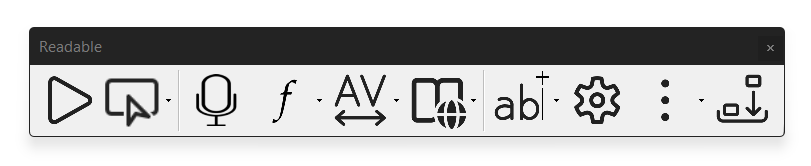
New in version 3, the Readable Banner is a calm, scrolling read-along line that displays text as it is spoken and follows along word by word. Set your own font, size and colours so it is comfortable to read, and keep your place without hunting across the page. A clear, low-distraction way to read along with anything on screen.
New in v3 How does it work →Save to Audio
Turn any text into a clear audio file you can keep and listen to later — on your phone, in the car, or while you work. Readable creates the audio on your PC using the same natural voices, so there is nothing to upload and no internet needed. Improved in version 3 with faster export and cleaner quality.
Improved in v3 How does it work →Ambient sounds
Readable includes a selection of sensory ambient sounds, such as gentle white noise, to help with focus and concentration. The audio controls balance the ambient sound against the spoken text automatically, so speech stays clear and to the front while the background sound sits comfortably beneath it.
How does it work →Writing & proofing
Word compatible
Readable supports your writing and proofreading in Microsoft Word, whether you use the local desktop app or Office 365 in the cloud. It adds extra accessibility support around the writing tools you already use — Microsoft Editor, references, spellcheck, Voice Access and word prediction — so the whole writing process is easier to hear, check and correct.
How does it work →Voice typing
Readable supports writing with your voice by providing efficient proofreading of what you dictate. It can echo back each phrase as you create it with Voice Access or Dragon Pro, or read your whole dictation back at the end. Hearing your words read aloud helps you catch errors and builds confidence and accuracy.
How does it work →Word card popup
New in version 3, the Word Information popup gives you an instant, offline definition and pronunciation for any word. Hold Ctrl+Shift over a word and a small popup appears with its meaning and how to say it — helpful for unfamiliar terms while reading or proofing, with nothing sent to the cloud.
New in v3 How does it work →Documents & exams
Speaks all text
Readable includes locally installed optical character recognition (OCR) that converts inaccessible, image-based text into accessible content you can hear and edit. The built-in text extractor captures and speaks the text you select with your cursor — even in scanned documents, images and apps that normally hide their text. Everything is processed on your PC.
How does it work →PDF Reader
The Sensory PDF Reader, included with Readable, is a dedicated, secure PDF viewer. Use it as a computer reader for exams (JCQ compliant) or for everyday PDF work. It adds speech controls, background-colour tinting and simple annotations, so PDFs are easier to read, hear and mark up.
How does it work →Try the exam demo →PDF Convert v2
New for version 3, Sensory PDF Convert turns scans, images and inaccessible PDFs into accessible formats — searchable PDF, plain text, RTF or Word — ready to read, edit or share. It runs on your PC, so even sensitive documents never leave your machine.
New in v3 How does it work →Comfort & personalisation
Readability tools
Readable includes tools for improving visual readability on your PC. Sensory Tint applies colour screen tinting — set any tint, switch to mono view or night mode, and choose colour-vision options. Sensory Ruler is a masking, variable-width screen ruler that helps you focus on the line you are reading. Together they cut glare and make long reading more comfortable.
How does it work →Sensory Fonts
New in version 3, Sensory Fonts gives you six built-in reading fonts chosen for comfort and clarity. Pick the typeface that suits you best — including options that aid letter recognition and reduce crowding — and apply it across your reading. A small change that can make a real difference to how easily text flows.
New in v3 How does it work →Content access
Readable adds further accessibility and ease of use across Microsoft Word and Windows. Sensory Tint and Ruler provide visual adjustments, while Readable can speak menu items, notifications and word predictions aloud — so more of what is on screen is accessible, not just the document text. Adjust background colour, spacing and font size to read the way that suits you.
Why Readable
Private & secure
The Sensory Readable network version (.msi) is a secure, signed, offline-installed Windows application. When you use the secure network installation, no data or personal information is passed from Readable to external cloud servers — your documents, your voices and everything you read stay on your own machine.
Easy to use
A powerful tool that stays simple. We are all used to text-to-speech on phones, home assistants and cars — Readable brings that ease to Windows for reading and writing support in education and the workplace. You will be up and running in minutes.
Getting started →Help Hub →Always improving
Actively developed by an expert team, where collaboration is vital. Readable v3 adds new on-device voices, the readable Banner, Sensory Fonts and new smart dynamic OCR & text flow. Our updates are shaped by how people respond. We welcome your feedback as you are experts in your own field. Contact us at support@sensory-at.com with any thoughts or queries.
Fair pricing
Fair, transparent pricing with perpetual licences available, and full support for DSA and Access to Work funding. Cost-effective education, government and corporate site licences are available on perpetual or annual terms — contact us for an individual quotation.
Independent
Privately owned and independent, so we answer to the people who use our assistive software and apps. That lets us take the long view, build what we identify as genuinely helpful.
Made in the UK
Designed and developed in the UK by people who understand accessibility and the readers who depend on it. When you get in touch you reach the people who actually make the software — not a ticket queue and not an overseas call centre.
Start your free trial
Get started with a no-obligation free trial.
Install directly to your Windows PC today.
Are you in Education, Government or Corporate?
Cost effective Education, Government and Corporate site licenses are available. There are options for perpetual licenses or annual licenses. Please contact us for an individualised license quotation.
System Specifications for Sensory Readable Suite for Windows with Natural and Sensory TTS Voices
Sensory Readable integrates and operates with Microsoft Windows system, Microsoft Office, and other programs open on the PC. It can also operate alongside other assistive technology such as screen magnifiers or Dragon speech recognition dictation software. Sensory App House recommends that users have a computer suitable to perform their study and work and be supported by assistive technology . Our recommended minimum specification for the Sensory Readable for Windows Suite is as follows.
Recommended Minimum Specification: Intel i5, 8GB RAM, 256GB HDD
If a user only require usage of elements of the Readable Suite, such as Sensory PDF Reader, then the following minimum specification is recommended.
Minimum Specification: Intel i3, 4GB RAM, HDD 128GB HDD
If you have computers on your organisation network, with lower specifications than the recommendations above, please contact us at support@sensory-AT.com – we can offer advice and support you to undertake performance testing of Sensory Readable in your computing environment.